
Capital One Travel
Capital One Services, LLCTravel & Local
4.7465.00 Reviews
- Version
- 1.33.0-10
- Installs
- 500.00K
- Age Rating
- Everyone
Screenshots

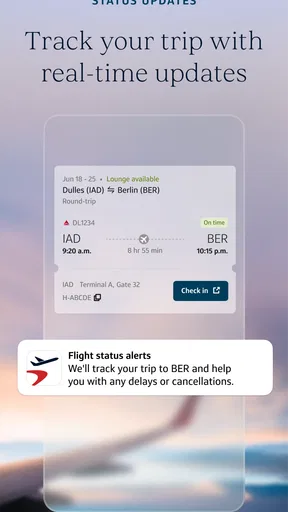
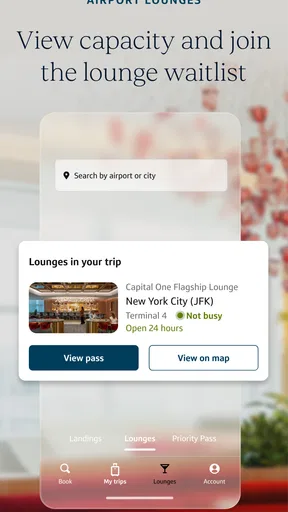
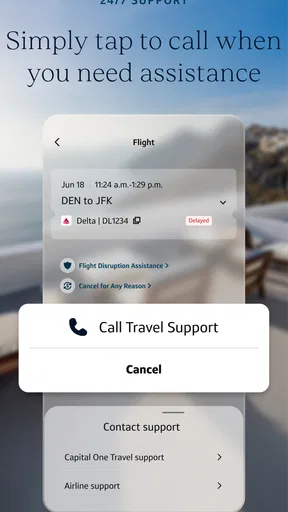
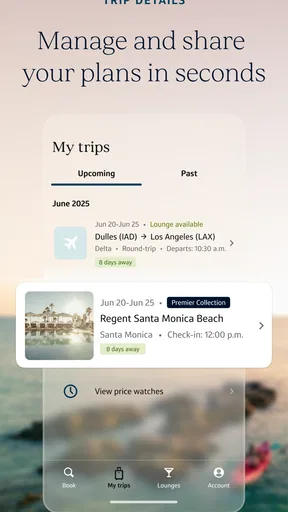
Our Review of Capital One Travel
 Analysis by Appyee
Travel planning can become tiring long before the trip begins, especially when I am switching between airline sites, hotel pages, maps, email confirmations, and payment tools. Capital One Travel is designed to bring that planning journey into one travel-focused app, and I found its main appeal in that concentration: it gives me a single place to begin searching and organizing instead of making me rebuild the same trip across several unrelated services.
Developed by Capital One Services, LLC, this free Travel & Local app is aimed at people who want a simpler way to explore travel options. It is available to an Everyone audience, runs on Android eleven or later, and its current version is 1.19.0-17. The app has reached over one hundred thousand installs, with a 4.6 average from around three thousand ratings and 352 written reviews. Those figures suggest a healthy level of interest, although they do not replace checking whether its approach fits the way you personally book travel.
How clearly the app guides different travelers
I find it helpful to judge the app not only by how quickly I can begin a search, but by whether its focused travel-planning approach suits the person using it. In the next section, I look at how clear that approach feels for different needs and levels of travel experience. That distinction matters: a simpler starting point can reduce clutter, while careful comparison and accessibility checks still take attention.
Readability and navigation during trip planning
My first impression is that Capital One Travel makes more sense when I treat it as a starting point for a journey rather than as a complete replacement for every travel service. The central idea is easy to understand: open the app, look for travel, compare possibilities, and continue planning from one place. That straightforward purpose matters for occasional travelers who may feel overwhelmed by a large booking website filled with unrelated offers, account prompts, and promotional panels.
The interface is most useful when I already know the broad shape of my trip. A destination, approximate timing, or preferred type of travel gives the experience direction. When I am still deciding where to go, I need to spend more time comparing options and interpreting details. That is not necessarily a flaw in this app; travel itself involves trade-offs. Still, people who want an app to make the decision for them may find the planning process more hands-on than expected.
For readability, I would use the app with the phone held at a comfortable distance and review important details slowly rather than rushing through a booking screen. Travel choices often involve dates, locations, cancellation conditions, and payment information, so a quick glance is not enough. The app’s value is reduced if I treat it like a fast swipe-through shopping feed. Its better use is as a focused workspace where I can pause and compare.
The most useful habit is to separate discovery from commitment. I first use the app to narrow down suitable choices, then reread the final details before proceeding. This is especially helpful for travelers who have difficulty processing dense screens or who need extra time to confirm that a selected date and destination are correct.
Navigation also depends on how familiar someone is with travel vocabulary. A frequent traveler may immediately understand the difference between a flexible option and a restrictive one, while a first-time traveler may need to investigate each condition before deciding. Capital One Travel can make the search feel more contained, but it cannot remove the need to understand what is being purchased. I would not recommend tapping through quickly simply because the layout feels less intimidating than a full desktop booking site.
Motor needs and sensory comfort
For users with motor limitations, a travel app is judged by more than whether it opens quickly. The important questions are whether controls are easy to reach, whether selections can be corrected without starting over, and whether the user can take a break without losing track of the journey. In my experience, the app is best approached in short stages. I would search first, compare second, and review the final choice separately. That reduces the amount of precise tapping required in one continuous session.
A phone can be easier than a desktop for someone who travels with limited hand movement because it keeps the whole task close at hand, but the opposite can also be true. Small touch targets, scrolling through long results, and entering dates on a compact screen may create extra effort. Someone who relies on a keyboard, switch access, voice control, or other system-level tools should test the main search and selection flow before depending on the app for an urgent booking. I would avoid presenting the experience as universally effortless because the physical device and operating-system setup make a real difference.
Sensory comfort is another practical consideration. Travel planning can involve many visually similar choices, and repeated comparison may become tiring for people who are sensitive to crowded screens, strong contrast, motion, or notification interruptions. I found it more comfortable to use the app in a quiet moment instead of while walking through a station or trying to make a decision in a noisy queue. A calm setting gives me time to read the details and reduces the chance of selecting the wrong option.
Users with low vision may prefer the largest comfortable system text and display settings available on their device, but enlarged text can change how much information fits on a screen. That creates a trade-off: reading becomes easier, while more scrolling may be necessary. I would check every important line rather than assuming that a compact summary contains all the conditions that matter. People who depend heavily on screen readers or magnification should verify how the app behaves with their particular setup before a time-sensitive trip, since the experience can vary between devices and system versions.
Using it in real travel situations
The strongest everyday scenario for me is planning a short break after work. I can open the app at home, search for a destination, compare the practical choices, and return later when I have enough attention to make a decision. That is more comfortable than trying to coordinate several browser tabs while tired. A traveler with dyslexia, attention difficulties, or limited concentration may also benefit from dividing the process into small sessions rather than attempting to complete everything in one sitting.
Another useful situation is shared planning. One person can use the app to gather possible travel choices while discussing dates and destinations with a partner or family member. This keeps the conversation focused on actual alternatives instead of vague ideas. I would still confirm the final selection with everyone involved, particularly when a child, older adult, or traveler with specific mobility or sensory needs is part of the group.
For business travelers, the app may be convenient when the goal is to begin a search quickly from a phone. However, anyone with strict company rules should compare the available choices with their organization’s booking requirements before committing. The app is not automatically the best workflow for every employer, and convenience should not override reimbursement or approval procedures.
It can also help a traveler who becomes anxious when faced with too many unrelated websites. Keeping the initial planning stage in a travel-specific environment reduces the mental cost of remembering where each detail was found. My practical tip is to write down the non-negotiables before searching: acceptable dates, maximum travel time, accessibility needs, and whether flexibility matters. That turns the app into a comparison tool instead of a source of endless browsing.
Situational access matters when connectivity, battery life, or attention is limited. I would not wait until boarding time to learn how the app handles an important reservation or account step. Planning in advance is safer, and I would keep essential confirmations available through the channels I normally use. The app can support the planning journey, but a traveler should not assume that one phone app is the only record worth keeping.
Where the experience still creates barriers
The biggest barrier is not necessarily the interface; it is the complexity of travel decisions. A clean search experience can still lead to difficult choices involving timing, location, flexibility, and total cost. Users who need very specific accommodations may have to do additional checking outside the app before they can feel confident. I would especially avoid relying on a broad search result as proof that a particular room, route, or facility will meet an individual need.
There is also a difference between finding an option and understanding its practical suitability. A traveler with limited mobility may care about transfers, walking distances, or the layout of a property. A person with sensory sensitivities may need information about noise and crowded environments. A parent may need details that are not central to a general travel search. Capital One Travel can help organize the first stage, but personal requirements still need careful verification.
Another limitation is the phone format itself. Travelers who compare many possibilities at once may prefer a larger screen, where dates, locations, and notes can remain visible together. The app is more appealing for focused searches than for building a complex multi-stop itinerary with many constraints. In that situation, a desktop browser or a specialist travel-planning tool may offer a clearer overview.
I also would not choose it as my only option if I strongly prefer direct communication with an airline, hotel, or transport provider from the beginning. Booking directly can make sense for travelers who already know exactly what they want, have an established loyalty relationship, or need to manage a complicated change with the provider itself. Capital One Travel is more compelling during discovery and comparison than when the user wants to bypass an intermediary and deal with one supplier.
People who require advanced accessibility information should be particularly cautious. The app may make travel search easier, but ease of search is not the same as guaranteed suitability. I would use it to identify possibilities, then contact the relevant provider when a specific accommodation affects whether the trip is realistic. That extra step is not a criticism unique to this app; it is a sensible safeguard for any travel marketplace.
How it compares with familiar alternatives
Compared with searching directly through airline or hotel apps, Capital One Travel offers a more consolidated beginning. Direct apps can be better when I have already chosen a provider and want its loyalty tools, account history, or service channels. The Capital One approach is better when I am still comparing destinations or travel choices and do not want to commit to one provider before seeing alternatives.
Compared with broad travel marketplaces, its identity is more focused. That can make the experience feel less scattered, but it may also feel less suitable for someone who wants every possible travel service, local activity, restaurant, and itinerary feature in the same place. I prefer a focused app when I am trying to solve one planning problem. I prefer a broader platform when the trip requires extensive destination research beyond the initial booking decision.
Compared with a desktop browser, the app wins on convenience and immediacy. I can begin planning from the sofa, during a break, or while discussing a trip with someone else. The browser wins when I need a wide view, several comparison points, or easier typing. My choice would depend less on brand loyalty and more on the complexity of the trip and the user’s comfort with a small touchscreen.
One non-obvious advantage is that the app can function as a decision filter for people who become stuck in endless searching. I would set a stopping rule before opening it: once I find a few choices that meet my essential requirements, I compare those rather than continuing indefinitely. The trade-off is that a filter only works if I know my priorities. Without that preparation, a convenient travel app can still encourage over-comparison.
Who should use it and who should choose another route
I would recommend Capital One Travel to travelers who want a free, phone-based place to begin planning and who appreciate seeing travel choices in a more concentrated environment. It is particularly suitable for short trips, early-stage research, and people who do not want to visit a separate provider site for every initial search. The Everyone content rating also makes it broadly approachable for households planning travel together.
I would be more cautious about recommending it to travelers with highly specialized accessibility needs, complicated multi-stop journeys, or strict requirements that must be confirmed directly with a provider. It may still be useful as a discovery tool, but it should not be treated as the final authority on whether a particular option will work for an individual. Travelers who prefer desktop comparison, direct booking, or an established provider relationship may be happier elsewhere.
Before relying on it, I would make sure the phone is running Android eleven or later and that the current app version, 1.19.0-17, works comfortably with the device’s text, display, and input settings. I would then perform a low-pressure test search rather than waiting until a last-minute trip. That small trial answers the questions that matter most: can I read the results, correct a selection, move through the process, and keep track of what I have chosen?
My final view is positive but measured. Capital One Travel is a useful travel-planning app from Capital One Services, LLC, especially when I want a clear place to start comparing possibilities on a phone. Its inclusive value comes from reducing some organizational friction, not from making every travel need automatically accessible. Use it as a thoughtful planning companion, then verify details that affect your personal comfort, mobility, communication, or safety. For many travelers, that balance makes it worth trying; for complex or highly individualized trips, a direct provider or larger-screen workflow may remain the better choice.
Privacy and Permissions
See what permissions an app requests and how it handles your data.
- Location
- approximate location (network-based), precise location (GPS and network-based)
- Phone
- read phone status and identity
- Camera
- take pictures and videos
- Wi-Fi connection information
- view Wi-Fi connections
- Device ID & call information
- read phone status and identity
- Other
- view network connections, change network connectivity, full network access, control Near Field Communication, run at startup, control vibration, prevent device from sleeping, Google Play license check
Verdict
Strengths of Capital One Travel
- Searches flights, hotels, and rental cars in one place.
- Price-drop protection can provide future travel credits on eligible bookings.
- Flexible cancellation options are clearly shown for many listings.
- Capital One cardholders may earn extra miles on qualifying purchases.
- Price prediction tools help indicate whether to book now or wait.
Limitations of Capital One Travel
- Many benefits require an eligible Capital One credit card.
- Some bookings may have stricter policies than booking directly.
- Travel credits and rewards can include eligibility restrictions.
- Search results may not include every airline or independent hotel.
- Customer support can be less direct for third-party reservations.
Other Releases by Capital One Services, LLC
View All
Capital One Mobile
Finance4.5

CreditWise from Capital One
Finance4.6

Auto Navigator New & Used Cars
Auto & Vehicles4.8
Similar Picks in This Category
View All
Google Maps
Google LLC3.4

Google Maps Go
Google LLC4.1

Booking.com: Hotels & Travel
Booking.com Hotels & Vacation Rentals4.8

Google Earth
Google LLC3.8

Skyscanner Flights Hotels Cars
Skyscanner Ltd4.8

trivago: Compare hotel prices
trivago N.V.4.4
Frequently Asked Questions
What is Capital One Travel, and who can use it?
Capital One Travel is an online travel booking platform connected to eligible Capital One credit cards. It allows users to search and reserve flights, hotels, and rental cars, while qualifying cardholders may receive access to rewards, price tools, travel credits, or special offers. Availability depends on your card, account status, location, and the type of booking you make.
Can I earn or redeem Capital One miles through Capital One Travel?
Eligible Capital One cardholders can generally use Capital One miles to cover qualifying travel purchases made through Capital One Travel, subject to the terms of their specific card. Some users may also earn rewards on bookings. Before confirming a reservation, review the displayed rewards rate, redemption value, expiration rules, and any restrictions because benefits vary between Capital One products.
Does Capital One Travel offer price protection or price-drop features?
Capital One Travel may provide tools that help users compare prices, monitor fare changes, and identify potentially better booking options. Certain flight reservations may qualify for price protection or related benefits, but coverage is not universal. Eligibility can depend on the itinerary, fare type, booking date, and card terms, so always read the conditions shown before purchasing.
Can I cancel or change a reservation booked through Capital One Travel?
Cancellation and change options depend on the airline, hotel, rental company, fare rules, and the terms presented during checkout. Some reservations are refundable or flexible, while others may be nonrefundable or include fees. Capital One Travel can help manage eligible bookings, but it cannot always override a supplier’s policy. Check the confirmation details carefully before finalizing.
Is Capital One Travel available as a standalone mobile app?
Capital One Travel is primarily accessed through Capital One’s website or the Capital One mobile banking app, depending on your device and account experience. Users typically sign in with their Capital One credentials to view eligible travel features and bookings. Availability, navigation, and supported services may differ by region, account type, and app version, so downloading the official app is recommended.
